Compare commits
8 Commits
dev_search
...
master
| Author | SHA1 | Date |
|---|---|---|
 hrlsm
hrlsm
|
f874153f2f | |
 young young
|
39b712ceb5 | |
|
young
|
2f3583c799 | |
|
young
|
612c2a314c | |
|
EricCml
|
f6d4f2302c | |
|
EricCml
|
1dc6d0b37b | |
 zhou1228 zhou1228
|
b6aa0295f9 | |
|
zhouhuaian
|
140b1f1fbb |
|
|
@ -1,8 +1,6 @@
|
|||
---
|
||||
sidebar_label: "介绍"
|
||||
label: "介绍"
|
||||
sidebar_position: 1
|
||||
slug: /
|
||||
---
|
||||
|
||||
# 关于GitLink
|
||||
|
|
@ -55,7 +53,7 @@ GitLink(确实开源)是CCF官方指定的开源创新服务平台,旨在
|
|||
<p>DevOps引擎(Engine)使用及设置[6个文档]</p>
|
||||
</a></article>
|
||||
<article class="col col--6 margin-bottom--lg">
|
||||
<a class="card padding--lg cardContainer" href="/docs/维基/模板导入及导出">
|
||||
<a class="card padding--lg cardContainer" href="/docs/维基/维基也面管理">
|
||||
<h2 class="text--truncate cardTitle" title="维基">维基</h2>
|
||||
<p>维基(Wiki)使用及设置[2个文档]</p>
|
||||
</a></article>
|
||||
|
|
@ -65,7 +63,7 @@ GitLink(确实开源)是CCF官方指定的开源创新服务平台,旨在
|
|||
<p>Bot市场使用及设置[4个文档]</p>
|
||||
</a></article>
|
||||
<article class="col col--6 margin-bottom--lg">
|
||||
<a class="card padding--lg cardContainer" href="/docs/第三方服务/跨平台代码同步">
|
||||
<a class="card padding--lg cardContainer" href="/docs/第三方服务/服务简介">
|
||||
<h2 class="text--truncate cardTitle" title="第三方服务">第三方服务</h2>
|
||||
<p>第三方服务使用及设置[3个文档]</p>
|
||||
</a></article>
|
||||
|
|
|
|||
|
|
@ -5,11 +5,13 @@ sidebar_position: 1
|
|||
|
||||
# 合并请求简介
|
||||
|
||||
**合并请求(PR)** 模块提供合并请求创建和管理两方面的功能:
|
||||
**Pull Request**,即**合并请求**,是现代分布式软件开发中两个软件仓库间合并代码变更的一种方式,通常用于 fork 仓库向被 fork 仓库(源仓库)提交代码变更,同时也是为团队项目或开源项目做贡献的一种非常好的团队协作方式。当你拉取并修改了他人的仓库代码后,将你的修改告知给原仓库的管理者,请求其合并你的修改,这个过程就被称为 **合并请求**。
|
||||
|
||||
- 一方面支持向源项目或者同一个项目其他分支创建(发起)代码合并请求(Pull Request,PR);
|
||||
GitLink中的 **合并请求(PR)** 模块提供合并请求创建和管理两方面的功能:
|
||||
|
||||
- 另一方面也为项目管理者对他人发送到本项目的合并请求进行管理、审阅并最终确定是否纳入项目。
|
||||
- 一方面支持向源仓库或者同一个仓库其他分支创建(发起)代码合并请求;
|
||||
|
||||
- 另一方面也为仓库管理者对他人发送到本仓库的合并请求进行管理、审阅并最终确定是否纳入仓库。
|
||||
|
||||
如下图所示为合并请求(PR)管理模块:
|
||||
|
||||
|
|
|
|||
|
|
@ -13,11 +13,75 @@ sidebar_position: 5
|
|||
|
||||
## 2. 填写信息
|
||||
|
||||
填写完需要导入的第三方Git项目地址后和项目信息后,点击导入项目
|
||||
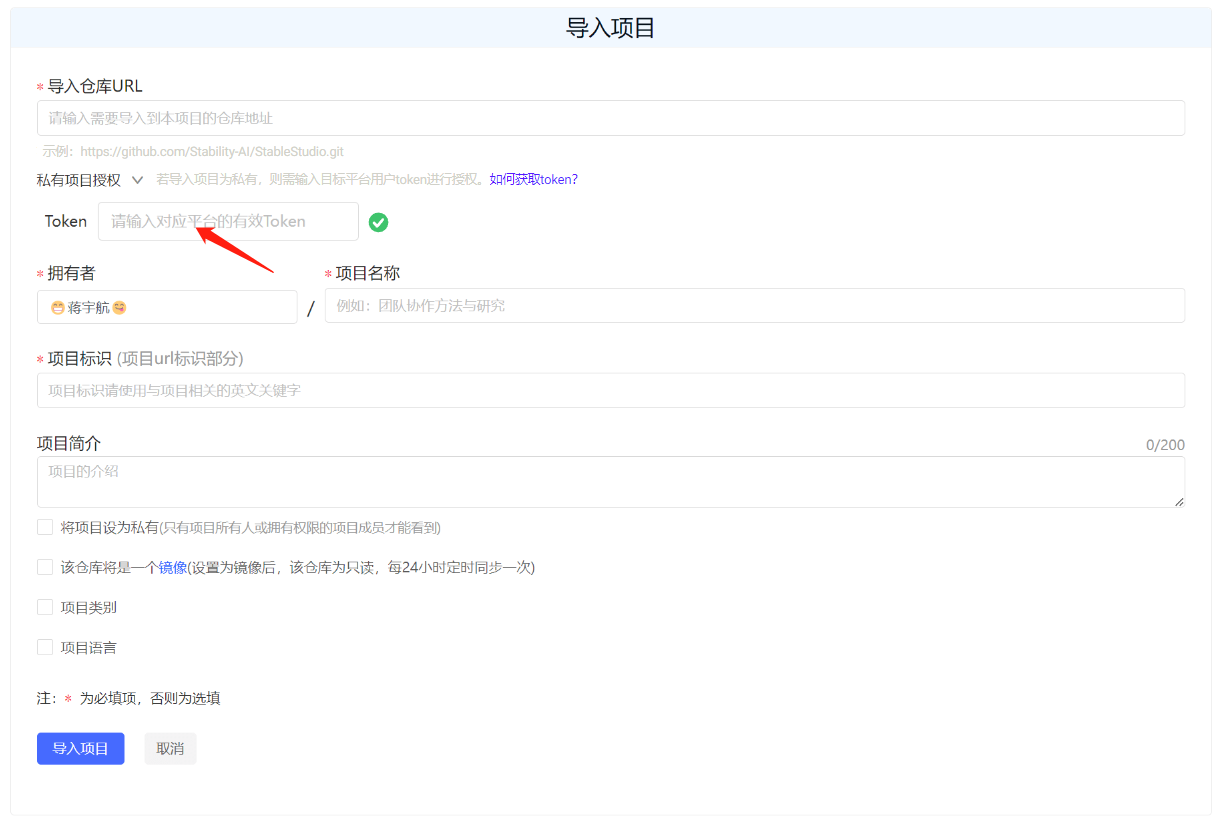
填写需要导入的第三方Git项目地址和项目信息,如果导入项目为私有仓库,则需输入目标平台用户token进行授权。
|
||||
|
||||

|
||||
|
||||
## 3. 导入成功
|
||||
## 3. 授权验证
|
||||
|
||||
在使用GitLink平台导入其他平台(如GitHub、Gitee)的开源项目时,如果项目为私有,则无法通过正常途径导入,需要输入对应平台有权限的token值进行校验。
|
||||
|
||||

|
||||
|
||||
下面将列举一些典型开源平台的token获取方式。
|
||||
|
||||
### GitHub token获取方式
|
||||
|
||||
1. 登录GitHub账号
|
||||
|
||||
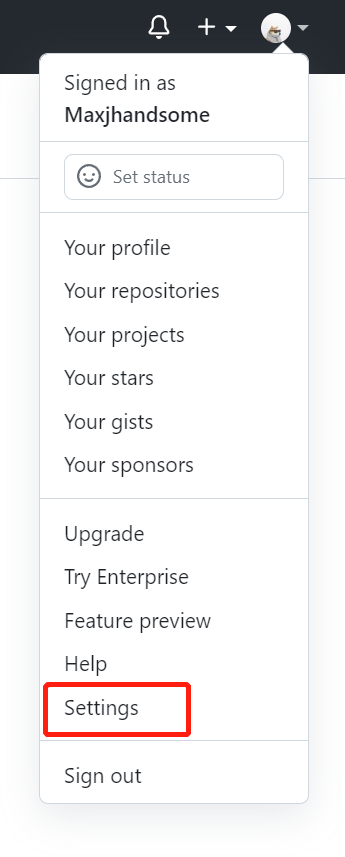
2. 访问用户头像下的settings菜单
|
||||
|
||||
|
||||
|
||||
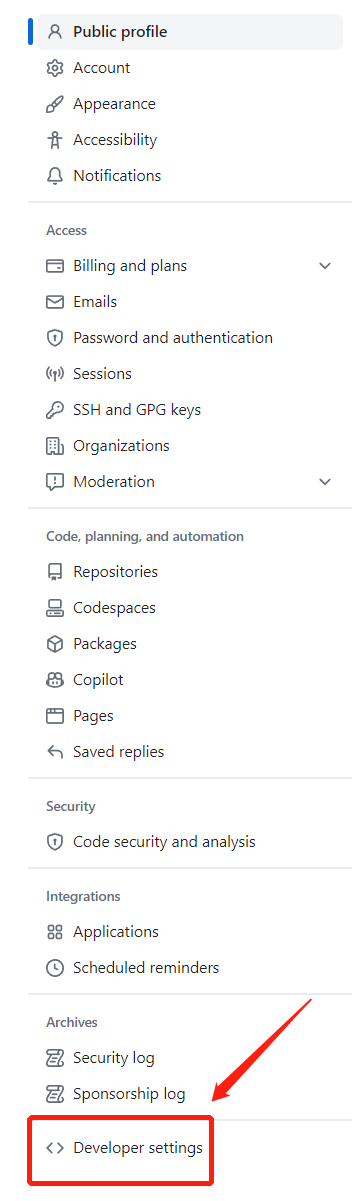
3. 访问最下方的Developer settings
|
||||
|
||||
|
||||
|
||||
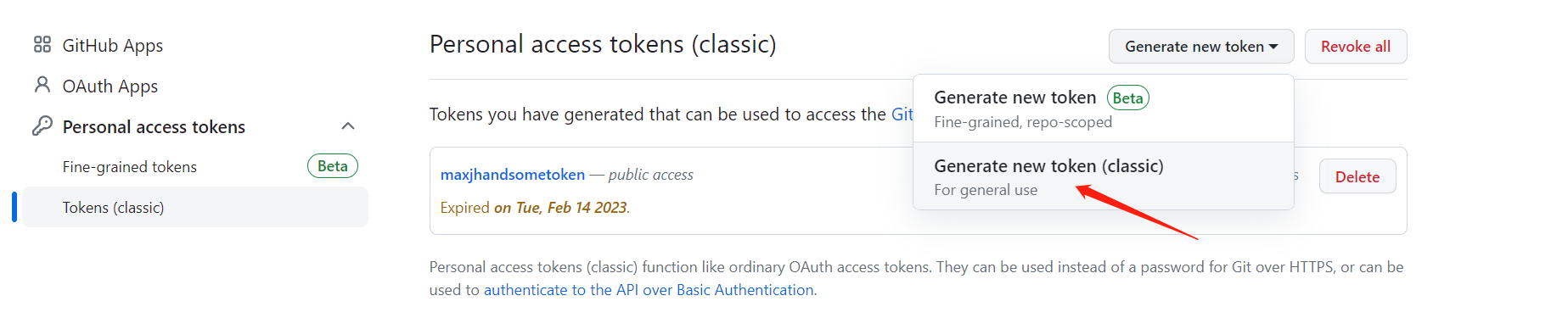
4. 在跳转页访问Token(classic),新建一个classic token(若已保存token)
|
||||
|
||||
|
||||
|
||||
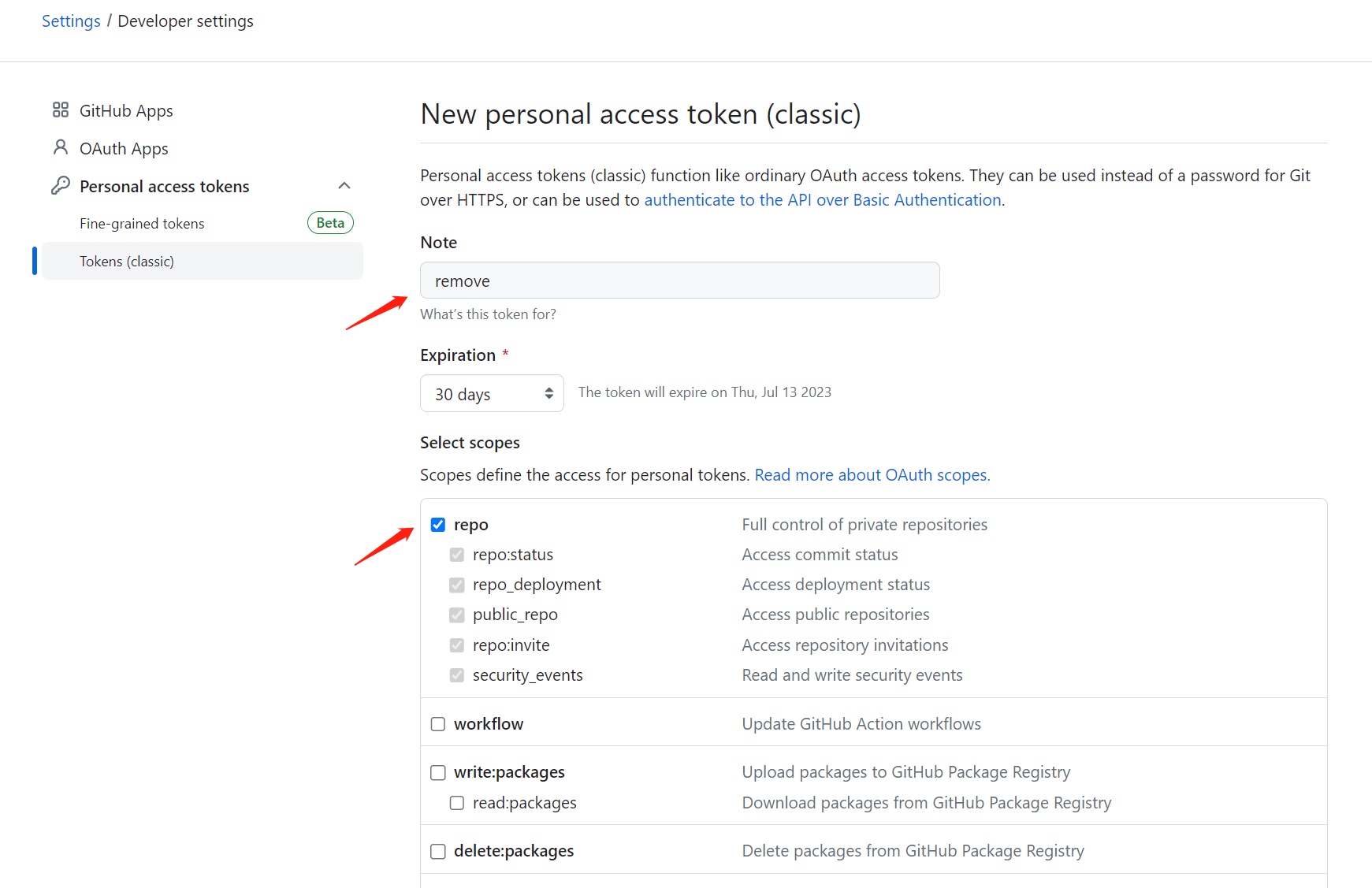
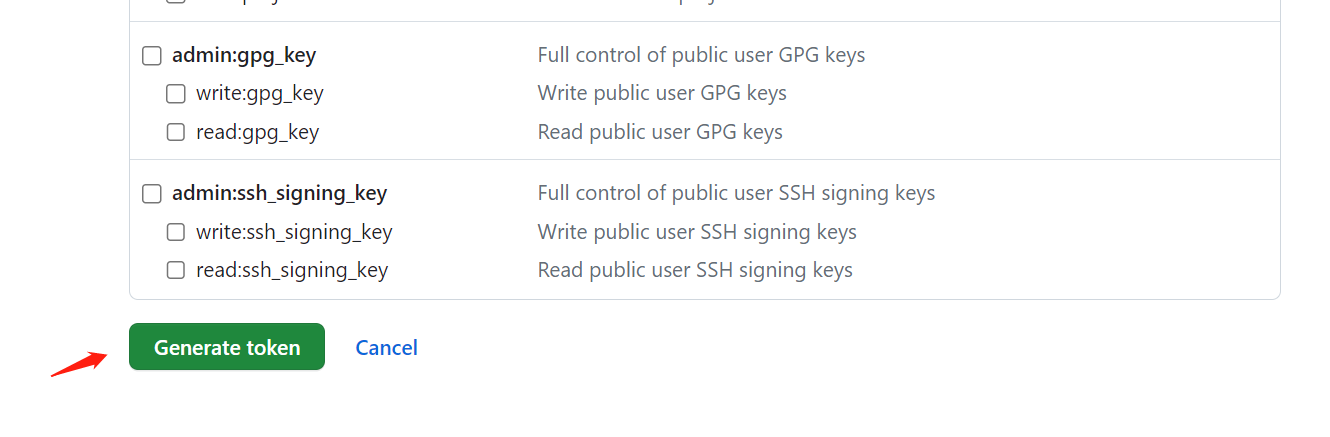
5. 在token配置页面,输入token用途,并确保该token已勾选“repo”选项,否则将导入失败
|
||||
|
||||
|
||||
|
||||
点击创建按钮
|
||||
|
||||
|
||||
|
||||
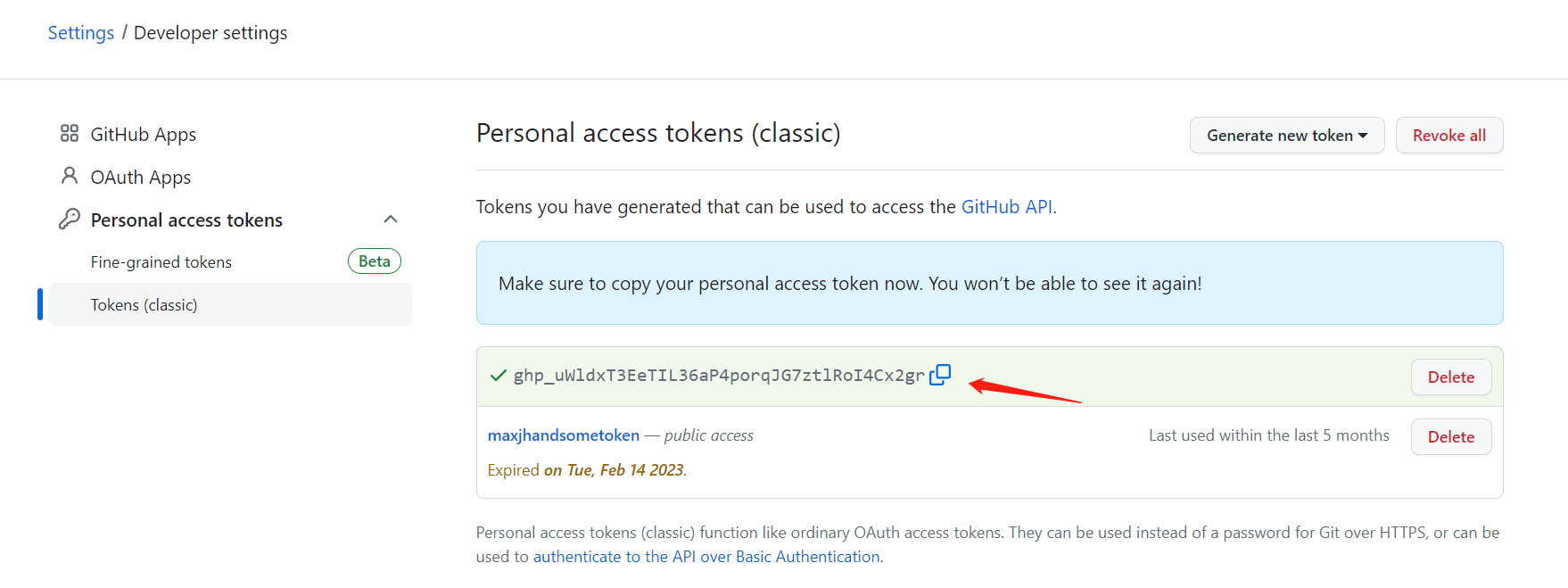
6. 复制该token
|
||||
|
||||
|
||||
|
||||
并将该token输入至GitLink导入项目认证填写框
|
||||
|
||||

|
||||
|
||||
### Gitee token获取方式
|
||||
|
||||
1. 登录Gitee账号
|
||||
|
||||
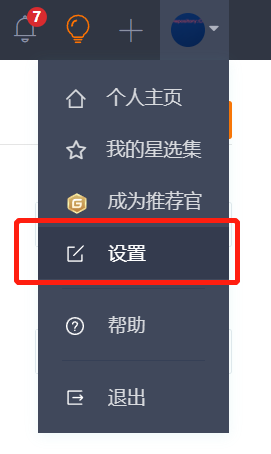
2. 访问用户头像下的设置菜单
|
||||
|
||||
|
||||
|
||||
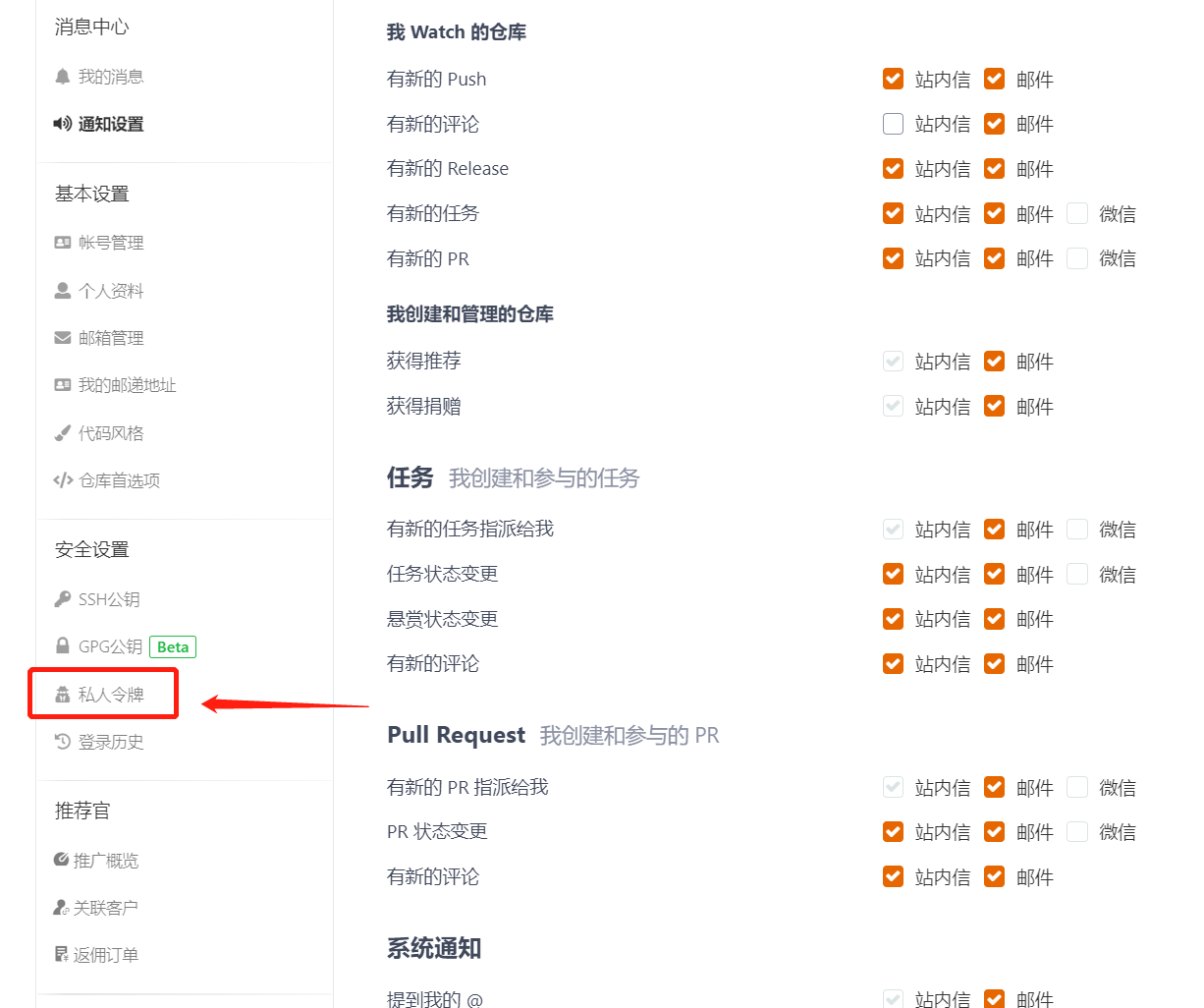
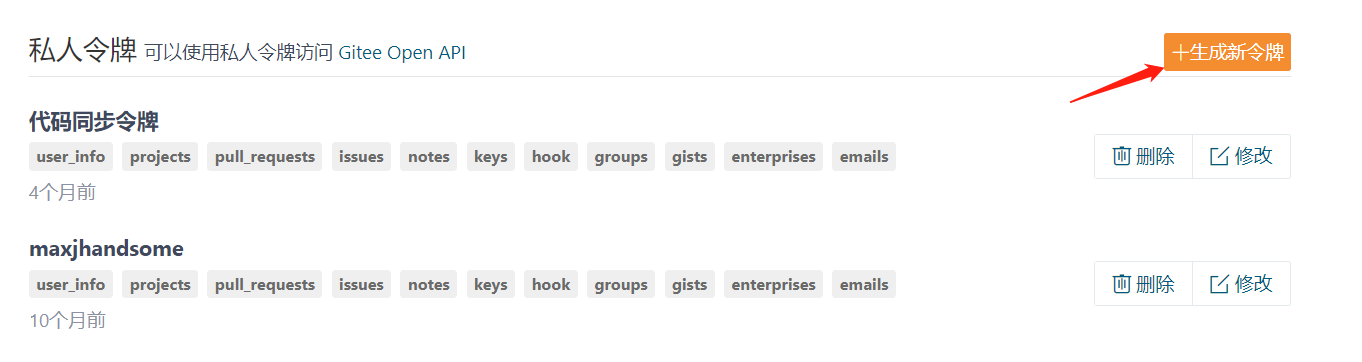
3. 访问“安全设置”栏下方“私人令牌”菜单
|
||||
|
||||
|
||||
|
||||
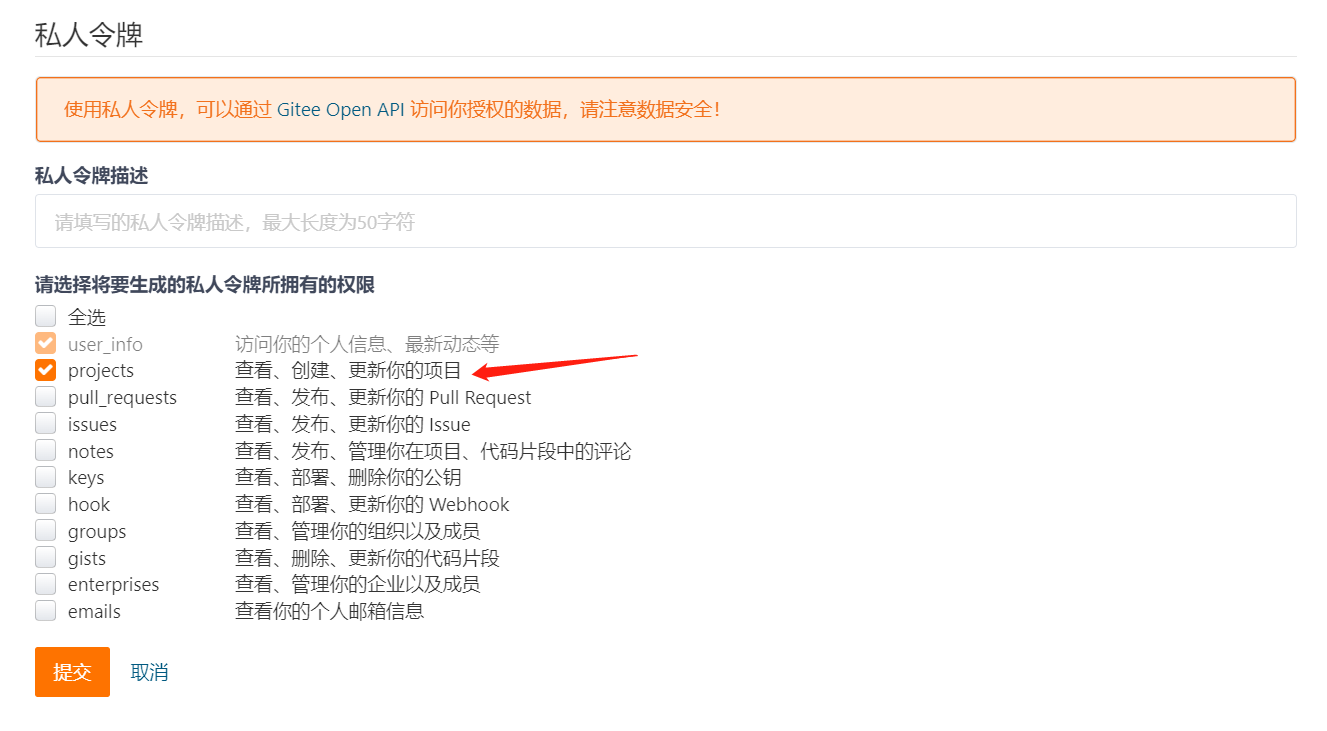
4. 点击生成新令牌,并在令牌生成页面配置令牌名称,并确保令牌已勾选“project”权限选项,并保存该令牌
|
||||
|
||||
|
||||
|
||||
|
||||
|
||||
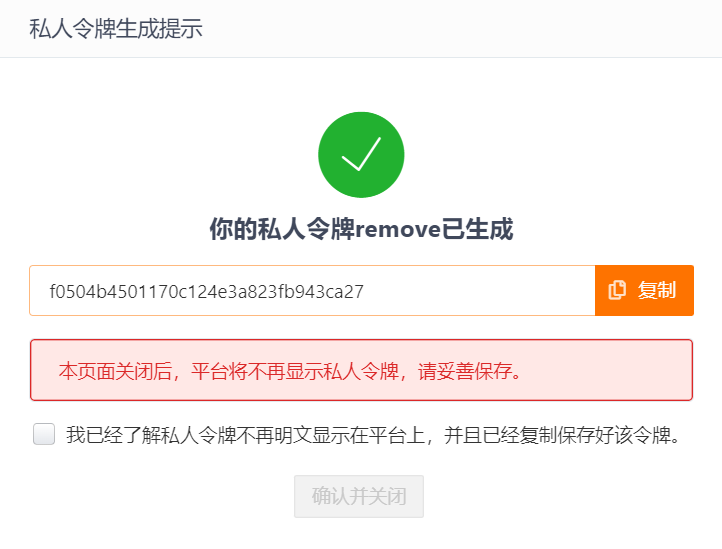
5. 在令牌生成成功的弹窗,复制该令牌,并将该token输入至GitLink导入项目认证填写框
|
||||
|
||||
|
||||
|
||||
|
||||
|
||||
## 4. 导入成功
|
||||
|
||||
提示正在从第三方Git项目地址迁移
|
||||
|
||||
|
|
|
|||
|
|
@ -18,5 +18,7 @@ GitLink默认疑修共有缺陷、功能、疑问、支持、任务、协助、
|
|||
- **文档:** 表示文档材料补充;
|
||||
- **测试:** 表示需要测试的需求;
|
||||
- **重复:** 表示已存在类似的疑修。
|
||||

|
||||
|
||||
另外,**项目成员**可以根据需求或习惯,进行标记含义或颜色标志的修改、新建标记和删除标记操作。
|
||||
另外,**项目成员**可以根据需求或习惯,进行标记含义或颜色标志的修改、新建标记和删除标记操作。
|
||||

|
||||
|
|
@ -10,4 +10,12 @@ sidebar_position: 2
|
|||
|
||||
2. 开始创建疑修,包括疑修标题、内容,输入疑修内容时既可以采用简单灵活的[Markdown语法](https://markdown.com.cn/),同时可以点击上方的功能按钮;然后上传需要的附件内容;最后点击“**创建**”按钮提交你的第一个疑修🎉🎉🎉
|
||||
|
||||

|
||||

|
||||
|
||||
3. 此外,在创建疑修时,可以通过符号 **`#`** 快速添加需要引用的疑修,进而为当前疑修提供辅助的信息;如下图所示,键入 **`#`** 后会弹出可引用的疑修列表,通过鼠标下滑或者键盘输入疑修编号选择需要引用的疑修后,会自动添加引用疑修的链接🔗
|
||||
|
||||

|
||||
|
||||

|
||||
|
||||
|
||||
|
|
|
|||
|
|
@ -6,6 +6,13 @@ sidebar_position: 5
|
|||
# 评论及操作记录
|
||||
### 评论
|
||||
每个疑修都相当于一个可以进度追踪的帖子,因此支持评论和回复,不仅仅是项目成员,所有人都可以在某个疑修下进行评论和回复,发表疑问或是见解,进行交流。
|
||||

|
||||
|
||||
### 疑修声明
|
||||
用户可以对任意疑修发布“疑修声明”,留言自己对于该疑修的解决思路。点击疑修详情右侧的“声明”后,可以编辑留言,编辑完成后点击“确认”即可发布声明,如下图所示:
|
||||

|
||||
|
||||
### 操作记录
|
||||
所有人都可以创建疑修,但是要注意,非项目成员仅可以修改自己创建的疑修,而项目成员有权限修改所有的疑修。
|
||||
对于某个疑修的所有编辑操作,包括**创建疑修、添加负责人、移除负责人、更改状态、更改优先级、添加标记、移除标记、添加里程碑、移除里程碑、设置关联分支、移除关联分支、设置开始日期和设置结束日期**,均被记录在操作记录中。
|
||||
对于某个疑修的所有编辑操作,包括**创建疑修、添加负责人、移除负责人、更改状态、更改优先级、添加标记、移除标记、添加里程碑、移除里程碑、设置关联分支、移除关联分支、设置开始日期和设置结束日期**,均被记录在操作记录中。
|
||||

|
||||
|
|
@ -12,13 +12,16 @@ sidebar_position: 7
|
|||
项目成员可以基于以下步骤创建里程碑:
|
||||
1. 进入目标项目的 **“里程碑”** 界面,此时界面所示为已创建的里程碑的列表,所有已创建里程碑分为 **“已关闭”** 和 **“开启中”** 两类;
|
||||
2. 点击上方的 **“+创建里程碑”** 按钮即可进入里程碑创建界面;
|
||||

|
||||
|
||||
3. 填写标题(必填)、描述(必填)、截止日期(选填)后,点击右下角的 **“创建里程碑”** 即可以完成一个新的里程碑的创建。
|
||||

|
||||
|
||||
### 关联里程碑
|
||||
项目成员可以将疑修关联到里程碑,从而使里程碑包含明确的疑修列表,主要步骤如下:
|
||||
1. 在疑修列表中点击目标疑修;
|
||||
2. 编辑“里程碑”属性,选择需要关联的里程碑。
|
||||
|
||||

|
||||
|
||||
### 其他操作
|
||||
- **开启里程碑**
|
||||
|
|
@ -26,4 +29,6 @@ sidebar_position: 7
|
|||
- **编辑里程碑**
|
||||
- **删除里程碑**
|
||||
|
||||
上述操作均可以在里程碑列表中,对目标里程碑进行处理实现。
|
||||
上述操作均可以在里程碑列表中,对目标里程碑进行处理实现,如下图所示:
|
||||

|
||||

|
||||
|
|
@ -1,4 +0,0 @@
|
|||
---
|
||||
sidebar_label: '跨平台代码同步'
|
||||
sidebar_position: 2
|
||||
---
|
||||
|
|
@ -1,71 +1,67 @@
|
|||
---
|
||||
sidebar_label: '重睛鸟代码溯源'
|
||||
sidebar_position: 1
|
||||
sidebar_label: "重睛鸟代码溯源"
|
||||
sidebar_position: 1
|
||||
---
|
||||
|
||||
## 代码分析入口
|
||||
|
||||

|
||||
<center>代码分析入口</center>
|
||||
<br/>
|
||||
|
||||
页面说明:
|
||||
- 1、在"维基"与"动态"之间加入"服务"菜单,并设计前置icon。
|
||||
- 2、用户可点击"服务"菜单 tab 进入服务页面。
|
||||
- 3、仓库管理员可在"仓库设置" tab 中项目导航处开启/关闭代码分析菜单可见性,如下图:
|
||||
<center>代码分析入口</center><br/>
|
||||
页面说明:<br/>
|
||||
1、用户可点击"服务"菜单 tab 进入服务页面。<br/>
|
||||
2、仓库管理员可在"仓库设置" tab 中项目导航处开启/关闭代码分析菜单可见性,如下图:<br/>
|
||||
|
||||

|
||||
<center>项目导航</center>
|
||||
<br/>
|
||||
|
||||
<center>项目导航</center><br/>
|
||||
|
||||
## 代码分析检测
|
||||

|
||||
<center>代码分析检测</center>
|
||||
|
||||
页面说明:
|
||||
- 1、此页面为暂无历史分析记录时页面展示。
|
||||
- 2、"新建分析"按钮仅对仓库管理员可见。仓库开发者、观察者、游客访问此页面时,"新建分析"按钮不可见。
|
||||
- 3、点击"新建分析"按钮,需判断该仓库是否已签订协议(是否开启代码分析功能)。
|
||||
<br/>
|
||||
|
||||
## 代码分析协议签订
|
||||

|
||||
<center>代码分析协议签订</center>
|
||||
<center>代码分析检测</center><br/>
|
||||
|
||||
页面说明:
|
||||
- 1、用户点击"新建分析"按钮,需判断该仓库是否已签订协议(是否开启代码分析功能),若未签订协议,则弹出签订协议弹窗。
|
||||
- 2、签订协议流程:
|
||||
①用户将垂直滚动条拉至最底部。
|
||||
②勾选阅读并同意协议条款。
|
||||
③点击同意协议(若未勾选"我已阅读并同意《用户协议及声明条款》",则"同意协议"按钮置灰)。
|
||||
- 3、用户勾选 CheckBox ,并点击"同意协议"按钮,逻辑上等同于代码溯源系统中新建一个账户。在页面交互上,相当于点击"新建分析"按钮弹出分支选择弹窗。
|
||||
<br/>
|
||||
|
||||
<center>新建分析</center><br/>
|
||||
页面说明:<br/>
|
||||
1、此页面为暂无历史分析记录时页面展示。<br/>
|
||||
2、"新建分析"按钮仅对仓库管理员可见。仓库开发者、观察者、游客访问此页面时,"新建分析"按钮不可见。<br/>
|
||||
3、点击"新建分析"按钮,需判断是否开启代码分析功能。<br/>
|
||||
|
||||
## 分支选择
|
||||

|
||||
<center>分支选择</center>
|
||||
|
||||
页面说明:
|
||||
- 1、用户点击“新建分析”按钮,弹出新建分析需要选择填写分支。
|
||||
- 2、图中检测类型、检测参数均为默认值,不允许用户修改,此处展示在界面上,仅起到提示用户,让用户知晓作用。
|
||||
- 3、点击此处“开始检测”即开启基于选中分支的检测,新建一个检测列表。
|
||||
<br/>
|
||||
|
||||
<center>分支选择</center><br/>
|
||||
页面说明:<br/>
|
||||
1、用户点击“新建分析”按钮,弹出新建分析需要选择填写分支。<br/>
|
||||
2、图中检测类型、检测参数均为默认值,不允许用户修改,此处展示在界面上,仅起到提示用户,让用户知晓作用。<br/>
|
||||
3、点击此处“开始检测”即开启基于选中分支的检测,新建一个检测列表。<br/>
|
||||
|
||||
## 列表展示
|
||||

|
||||
<center>列表展示</center>
|
||||
|
||||
页面说明:
|
||||
- 1、当检测列表行数超过一行时,“新建分析”按钮左侧提供分支名称的筛选下拉框,下拉框内选项为列表中分支的集合。若本仓库有分支1、2、3、4、5,此列表中有分支3、4,则此处下拉框中分支类型仅为3、4。
|
||||
- 2、当新建分析任务正在检测中时,检测状态处有百分比进度条展示现有进度。
|
||||
- 3、点击“重新扫描”按钮,将弹出一条新建分析的弹窗,此弹窗保存所有上次已配置的分支信息,检测分支不可修改(分支下拉选中框置灰)。确认新建后,将新增一条检测数据。
|
||||
- 4、点击删除将出现二次确认弹框:“此操作将永久删除该检测记录,是否继续?”,用户点击确认后,此条检测记录将从列表中移除。
|
||||
<br/>
|
||||
|
||||
<center>列表展示</center><br/>
|
||||
页面说明:<br/>
|
||||
1、当检测列表行数超过一行时,“新建分析”按钮左侧提供分支名称的筛选下拉框,下拉框内选项为列表中分支的集合。若本仓库有分支1、2、3、4、5,此列表中有分支3、4,则此处下拉框中分支类型仅为3、4。<br/>
|
||||
2、当新建分析任务正在检测中时,检测状态处有百分比进度条展示现有进度。<br/>
|
||||
3、点击“重新扫描”按钮,将弹出一条新建分析的弹窗,此弹窗保存所有上次已配置的分支信息,检测分支不可修改(分支下拉选中框置灰)。确认新建后,将新增一条检测数据。<br/>
|
||||
|
||||
## 结果展示
|
||||

|
||||
<center>结果展示</center>
|
||||
页面说明:
|
||||
- 1、用户在代码检测"操作"列表点击"查看"按钮,将在当前页面展开结果展示页面。当用户再次点击"查看"按钮后,结果展示页面收回;当用户点击其他检测记录"查看"按钮后,将展开其他检测记录的结果页,收回当前已展开的结果展示页;
|
||||
- 2、当检测状态为"失败"状态,或当前处于"正在检测"状态时,"查看"按钮将置灰,处于无法点击状态;
|
||||
- 3、结果展示页取代码溯源已有页面,嵌入至 GitLink 即可,无需再次设计。
|
||||
|
||||
<br/>
|
||||
|
||||
<center>结果展示</center><br/>
|
||||
页面说明:<br/>
|
||||
1、用户在代码检测"操作"列表点击"查看"按钮,将在当前页面展开结果展示页面。当用户再次点击"查看"按钮后,结果展示页面收回;当用户点击其他检测记录"查看"按钮后,将展开其他检测记录的结果页,收回当前已展开的结果展示页;<br/>
|
||||
2、当检测状态为"失败"状态,或当前处于"正在检测"状态时,"查看"按钮将置灰,处于无法点击状态;<br/>
|
||||
3、结果展示页取代码溯源已有页面,嵌入至 GitLink 即可,无需再次设计。<br/>
|
||||
|
||||
## 用户操作流程
|
||||

|
||||
<center>用户操作流程</center>
|
||||
|
||||
<br/>
|
||||
|
||||
<center>用户操作流程</center><br/>
|
||||
|
|
|
|||
|
|
@ -5,7 +5,7 @@ const darkCodeTheme = require('prism-react-renderer/themes/dracula');
|
|||
module.exports = {
|
||||
title: 'gitlink',
|
||||
tagline: 'gitlink帮助中心',
|
||||
onBrokenLinks: 'ignore',
|
||||
onBrokenLinks: 'throw',
|
||||
onBrokenMarkdownLinks: 'warn',
|
||||
favicon: 'img/icon.ico',
|
||||
url: 'https://luffyzh.github.io',
|
||||
|
|
@ -13,21 +13,15 @@ module.exports = {
|
|||
organizationName: 'luffyZh', // Usually your GitHub org/user name.
|
||||
projectName: 'docusaurus-luffyzh-website', // Usually your repo name.
|
||||
themeConfig: {
|
||||
colorMode: {
|
||||
defaultMode: 'light',
|
||||
disableSwitch: false,
|
||||
respectPrefersColorScheme: true,
|
||||
},
|
||||
aloglia:{
|
||||
algolia: {
|
||||
apiKey: '0f9f28b9ab9efae89810921a351753b5',
|
||||
indexName: 'github',
|
||||
},
|
||||
navbar: {
|
||||
style:"dark",
|
||||
title: '',
|
||||
logo: {
|
||||
alt: 'gitlink',
|
||||
src: 'img/gitlink.png'
|
||||
src: 'img/gitlink.png',
|
||||
},
|
||||
items: [
|
||||
{
|
||||
|
|
@ -36,75 +30,44 @@ module.exports = {
|
|||
position: 'left',
|
||||
label: '帮助中心',
|
||||
}
|
||||
]
|
||||
],
|
||||
},
|
||||
footer: {
|
||||
style: 'dark',
|
||||
logo:{
|
||||
src:"img/gitlink.png"
|
||||
},
|
||||
links: [
|
||||
{
|
||||
title: '社区',
|
||||
title: 'Docs',
|
||||
items: [
|
||||
{
|
||||
label: '网站首页',
|
||||
to: 'https://www.gitlink.org.cn',
|
||||
},
|
||||
{
|
||||
label: '关于我们',
|
||||
to: 'https://www.gitlink.org.cn/aboutus',
|
||||
},
|
||||
{
|
||||
label: '教学实践',
|
||||
to: 'https://www.gitlink.org.cn/educoder',
|
||||
},
|
||||
{
|
||||
label: '合作伙伴',
|
||||
to: 'https://forum.trustie.net/forums/5030/detail',
|
||||
label: '文档',
|
||||
to: '/docs/intro',
|
||||
},
|
||||
],
|
||||
},
|
||||
{
|
||||
title: '支持与服务',
|
||||
title: 'Blog',
|
||||
items: [
|
||||
{
|
||||
label: 'API文档',
|
||||
to: 'https://forgeplus.trustie.net/docs/api',
|
||||
},
|
||||
{
|
||||
label: 'Git常用命令',
|
||||
to: 'https://git-scm.com',
|
||||
},
|
||||
{
|
||||
label: '引擎使用手册',
|
||||
to: 'https://forum.gitlink.org.cn/forums/7487/detail',
|
||||
},
|
||||
{
|
||||
label: '服务协议',
|
||||
to: 'https://forum.trustie.net/forums/5029/detail',
|
||||
label: '博客',
|
||||
to: '/blog',
|
||||
},
|
||||
],
|
||||
},
|
||||
{
|
||||
title: '加入我们',
|
||||
title: '更多',
|
||||
items: [
|
||||
{
|
||||
label: '官网邮箱:gitlink@ccf.org.cn',
|
||||
to:"https://www.gitlink.org.cn"
|
||||
label: '掘金',
|
||||
href: 'https://juejin.cn/user/96412752681079'
|
||||
},
|
||||
{
|
||||
label:'QQ群',
|
||||
to:'https://www.gitlink.org.cn'
|
||||
label: 'GitHub',
|
||||
href: 'https://github.com/luffzh/docusaurus-luffyzh-website',
|
||||
},
|
||||
{
|
||||
label:'公众号',
|
||||
to:'https://www.gitlink.org.cn'
|
||||
}
|
||||
],
|
||||
},
|
||||
],
|
||||
copyright: `<p>©Copyright ${new Date().getFullYear()} CCF 开源发展委员会</p><p>Powered by Trustie& IntelliDE 京ICP备13000930号</p>`,
|
||||
copyright: `<p>©Copyright 2023 CCF 开源发展委员会</p><p>Powered by Trustie& IntelliDE 京ICP备13000930号</p>`,
|
||||
},
|
||||
prism: {
|
||||
theme: lightCodeTheme,
|
||||
|
|
@ -121,7 +84,6 @@ module.exports = {
|
|||
sidebarPath: require.resolve('./sidebars.js'),
|
||||
//此为网页左下的Edit this page 链接地址
|
||||
editUrl:'https://www.gitlink.org.cn/Gitlink/gitlink_help_center/tree/master/',
|
||||
routeBasePath: "/",
|
||||
},
|
||||
//修饰的css文件格式
|
||||
theme: {
|
||||
|
|
@ -130,9 +92,6 @@ module.exports = {
|
|||
},
|
||||
],
|
||||
],
|
||||
plugins: [
|
||||
['@cmfcmf/docusaurus-search-local', {}]
|
||||
],
|
||||
i18n: {
|
||||
defaultLocale: 'zh-cn',
|
||||
locales: ['zh-cn'],
|
||||
|
|
|
|||
32
package.json
|
|
@ -1,32 +1,31 @@
|
|||
{
|
||||
"name": "docusaurus",
|
||||
"name": "my-website",
|
||||
"version": "0.0.0",
|
||||
"private": true,
|
||||
"scripts": {
|
||||
"docusaurus": "docusaurus",
|
||||
"dev": "docusaurus start --port 3000",
|
||||
"start": "docusaurus start",
|
||||
"build": "docusaurus build",
|
||||
"swizzle": "docusaurus swizzle",
|
||||
"deploy": "docusaurus deploy",
|
||||
"gh-pages": "sh ./deploy.sh",
|
||||
"clear": "docusaurus clear",
|
||||
"serve": "docusaurus serve",
|
||||
"write-translations": "docusaurus write-translations",
|
||||
"write-heading-ids": "docusaurus write-heading-ids"
|
||||
},
|
||||
"dependencies": {
|
||||
"@cmfcmf/docusaurus-search-local": "1.1.0",
|
||||
"@docusaurus/core": "2.4.1",
|
||||
"@docusaurus/plugin-client-redirects": "2.4.1",
|
||||
"@docusaurus/preset-classic": "2.4.1",
|
||||
"@docusaurus/theme-classic": "^2.4.1",
|
||||
"@docusaurus/theme-search-algolia": "^2.4.1",
|
||||
"@mdx-js/react": "1.6.22",
|
||||
"clsx": "1.2.1",
|
||||
"docusaurus-gtm-plugin": "0.0.2",
|
||||
"docusaurus-plugin-image-zoom": "1.0.1",
|
||||
"react": "17.0.2",
|
||||
"react-dom": "17.0.2",
|
||||
"react-modal": "3.16.1"
|
||||
"@docusaurus/core": "2.0.0-beta.3",
|
||||
"@docusaurus/preset-classic": "2.0.0-beta.3",
|
||||
"@docusaurus/theme-search-algolia": "^2.0.0-beta.5",
|
||||
"@mdx-js/react": "^1.6.21",
|
||||
"@svgr/webpack": "^5.5.0",
|
||||
"clsx": "^1.1.1",
|
||||
"file-loader": "^6.2.0",
|
||||
"prism-react-renderer": "^1.2.1",
|
||||
"react": "^17.0.1",
|
||||
"react-dom": "^17.0.1",
|
||||
"url-loader": "^4.1.1"
|
||||
},
|
||||
"browserslist": {
|
||||
"production": [
|
||||
|
|
@ -39,8 +38,5 @@
|
|||
"last 1 firefox version",
|
||||
"last 1 safari version"
|
||||
]
|
||||
},
|
||||
"engines": {
|
||||
"node": ">=14.18.1 <=18.x"
|
||||
}
|
||||
}
|
||||
|
|
|
|||
|
|
@ -7,7 +7,7 @@
|
|||
|
||||
/* You can override the default Infima variables here. */
|
||||
:root {
|
||||
--ifm-color-primary: #466aff;
|
||||
--ifm-color-primary: #25c2a0;
|
||||
--ifm-color-primary-dark: rgb(33, 175, 144);
|
||||
--ifm-color-primary-darker: rgb(31, 165, 136);
|
||||
--ifm-color-primary-darkest: rgb(26, 136, 112);
|
||||
|
|
@ -43,93 +43,3 @@ html[data-theme=light] .menu{
|
|||
html[data-theme='dark'] .docusaurus-highlight-code-line {
|
||||
background-color: rgba(0, 0, 0, 0.3);
|
||||
}
|
||||
.footer{
|
||||
height: 473px;
|
||||
position: relative;
|
||||
background: #1e1e1e;
|
||||
}
|
||||
.container{
|
||||
height: 100%;
|
||||
display: flex;
|
||||
flex-direction: column;
|
||||
justify-content: space-around;
|
||||
}
|
||||
.footer__bottom .margin-bottom--sm{
|
||||
position: absolute;
|
||||
margin-top: -150px;
|
||||
top:50%
|
||||
}
|
||||
.footer__links .footer__title{
|
||||
height: 25px;
|
||||
font-size: 18px;
|
||||
font-weight: 600;
|
||||
color: #fff;
|
||||
line-height: 25px;
|
||||
margin-bottom: 20px;
|
||||
}
|
||||
.footer__links .footer__col:last-child .footer__items:last-child{
|
||||
display: flex;
|
||||
flex-wrap: wrap;
|
||||
}
|
||||
.footer__links .footer__col:last-child .footer__items:last-child .footer__item{
|
||||
width: 50%;
|
||||
}
|
||||
.footer__links .footer__col:last-child .footer__items:last-child .footer__item:nth-child(2){
|
||||
background-image: url(../../static/img/gitlink-qq.png);
|
||||
background-size: 100% 100%;
|
||||
height: 90px;
|
||||
width: 90px;
|
||||
background-color: #fff;
|
||||
border-radius: 4px;
|
||||
position: relative;
|
||||
}
|
||||
.footer__links .footer__col:last-child .footer__items:last-child .footer__item:nth-child(3){
|
||||
background-image: url(../../static/img/gongzhong.png);
|
||||
background-size: 100% 100%;
|
||||
height: 90px;
|
||||
width: 90px;
|
||||
background-color: #fff;
|
||||
border-radius: 4px;
|
||||
position: relative;
|
||||
margin-left: 34px;
|
||||
}
|
||||
.footer__links .footer__col:last-child .footer__items:last-child .footer__item:nth-child(2) a,
|
||||
.footer__links .footer__col:last-child .footer__items:last-child .footer__item:nth-child(3) a{
|
||||
position: absolute;
|
||||
top: 95px;
|
||||
left: 50%;
|
||||
margin-left: -17px;
|
||||
}
|
||||
.footer__links .footer__col:last-child .footer__items:last-child .footer__item:first-child{
|
||||
width: 100%;
|
||||
}
|
||||
.container .footer__links{
|
||||
margin-left: 420px;
|
||||
}
|
||||
.container .footer__links .footer__col .footer__item{
|
||||
color: #bdc2d1;
|
||||
font-size: 14px;
|
||||
font-weight: 400;
|
||||
line-height: 20px;
|
||||
height: 20px;
|
||||
margin-bottom: 15px;
|
||||
}
|
||||
.footer__bottom .margin-bottom--sm img{
|
||||
width: 300px;
|
||||
max-width: unset;
|
||||
}
|
||||
.container .footer__copyright{
|
||||
position: absolute;
|
||||
width: 100%;
|
||||
left: 0px;
|
||||
font-size: 12px;
|
||||
font-weight: 400;
|
||||
color: #bdc2d1;
|
||||
line-height: 28px;
|
||||
padding: 15px 0;
|
||||
text-align: center;
|
||||
background-color: #1b212c;
|
||||
}
|
||||
.container .footer__copyright p{
|
||||
margin-bottom: 0px!important;
|
||||
}
|
||||
|
|
@ -10,7 +10,6 @@
|
|||
text-align: center;
|
||||
position: relative;
|
||||
overflow: hidden;
|
||||
background-color: #25c2a0;
|
||||
}
|
||||
|
||||
@media screen and (max-width: 966px) {
|
||||
|
|
|
|||
|
|
@ -1,11 +0,0 @@
|
|||
/**
|
||||
* Copyright (c) Facebook, Inc. and its affiliates.
|
||||
*
|
||||
* This source code is licensed under the MIT license found in the
|
||||
* LICENSE file in the root directory of this source tree.
|
||||
*/
|
||||
// By default, the classic theme does not provide any SearchBar implementation
|
||||
// If you swizzled this file, it is your responsibility to provide an implementation
|
||||
// Tip: swizzle the SearchBar from the Algolia theme for inspiration:
|
||||
// npm run swizzle @docusaurus/theme-search-algolia SearchBar
|
||||
export {default} from '@docusaurus/Noop';
|
||||

|
After Width: | Height: | Size: 34 KiB |

|
After Width: | Height: | Size: 39 KiB |

|
After Width: | Height: | Size: 37 KiB |

|
After Width: | Height: | Size: 63 KiB |

|
After Width: | Height: | Size: 88 KiB |

|
After Width: | Height: | Size: 105 KiB |

|
After Width: | Height: | Size: 46 KiB |

|
After Width: | Height: | Size: 59 KiB |

|
After Width: | Height: | Size: 34 KiB |

|
After Width: | Height: | Size: 33 KiB |

|
After Width: | Height: | Size: 191 KiB |

|
After Width: | Height: | Size: 153 KiB |

|
Before Width: | Height: | Size: 112 KiB |

|
Before Width: | Height: | Size: 80 KiB After Width: | Height: | Size: 39 KiB |

|
Before Width: | Height: | Size: 84 KiB After Width: | Height: | Size: 56 KiB |

|
Before Width: | Height: | Size: 129 KiB After Width: | Height: | Size: 31 KiB |

|
After Width: | Height: | Size: 13 KiB |

|
Before Width: | Height: | Size: 79 KiB After Width: | Height: | Size: 33 KiB |

|
Before Width: | Height: | Size: 254 KiB After Width: | Height: | Size: 64 KiB |

|
Before Width: | Height: | Size: 18 KiB After Width: | Height: | Size: 8.0 KiB |

|
Before Width: | Height: | Size: 9.1 KiB |

|
Before Width: | Height: | Size: 8.7 KiB |

|
Before Width: | Height: | Size: 89 KiB After Width: | Height: | Size: 102 KiB |

|
After Width: | Height: | Size: 95 KiB |